October 21, 2026
Task mining: complete guide
Task mining is back on the agenda as a foundational input for AI transformation. Here's how it works, how it differs from process mining, and where it falls short.

Task mining used to sit firmly in the RPA (robotic process automation) toolkit, a way to find the next click sequence worth automating. Now, it’s re-entering the conversation as part of a much bigger question: how do you decide where AI and automation can actually improve the way your organization works?
As AI transformation initiatives multiply across finance, operations, IT, and customer support, they all need the same foundational input: an accurate, evidence-based picture of how workflows and individual tasks actually get done. For AI leaders evaluating process discovery, process intelligence, or automation opportunities, task mining provides one way to build that picture. But it only captures part of it.
Whether you're evaluating task mining as a standalone tool, comparing it with process mining, or considering it as one input into a broader process improvement and automation initiative, it's worth understanding exactly what it captures, what it doesn't, and where it fits alongside other approaches.
What is task mining?
Task mining is a technology that captures user interaction data, including keystrokes, mouse clicks, screenshots, application usage, and timestamps, to reconstruct how people complete individual tasks on their computers. It can reveal repetitive tasks, bottlenecks, variations, and potential automation opportunities within day-to-day workflows.
Task mining is distinct from process mining. The simplest way to distinguish task mining from process mining is by the level of work each one captures:
- Task mining: Uses desktop-level user interaction data to understand the individual steps people take to complete specific tasks.
- Process mining: Uses event logs from business systems such as ERP and CRM platforms to reconstruct and analyze end-to-end processes across systems.
Task mining has taken on a broader role as AI transformation has accelerated. AI initiatives need accurate workflow data to identify and prioritize automation opportunities, and task mining provides a granular view of how work gets done: individual clicks and interactions, not just system-level handoffs.
How task mining works
Task mining records desktop activity and turns it into a map of how individual tasks are completed.
The process typically looks like this:
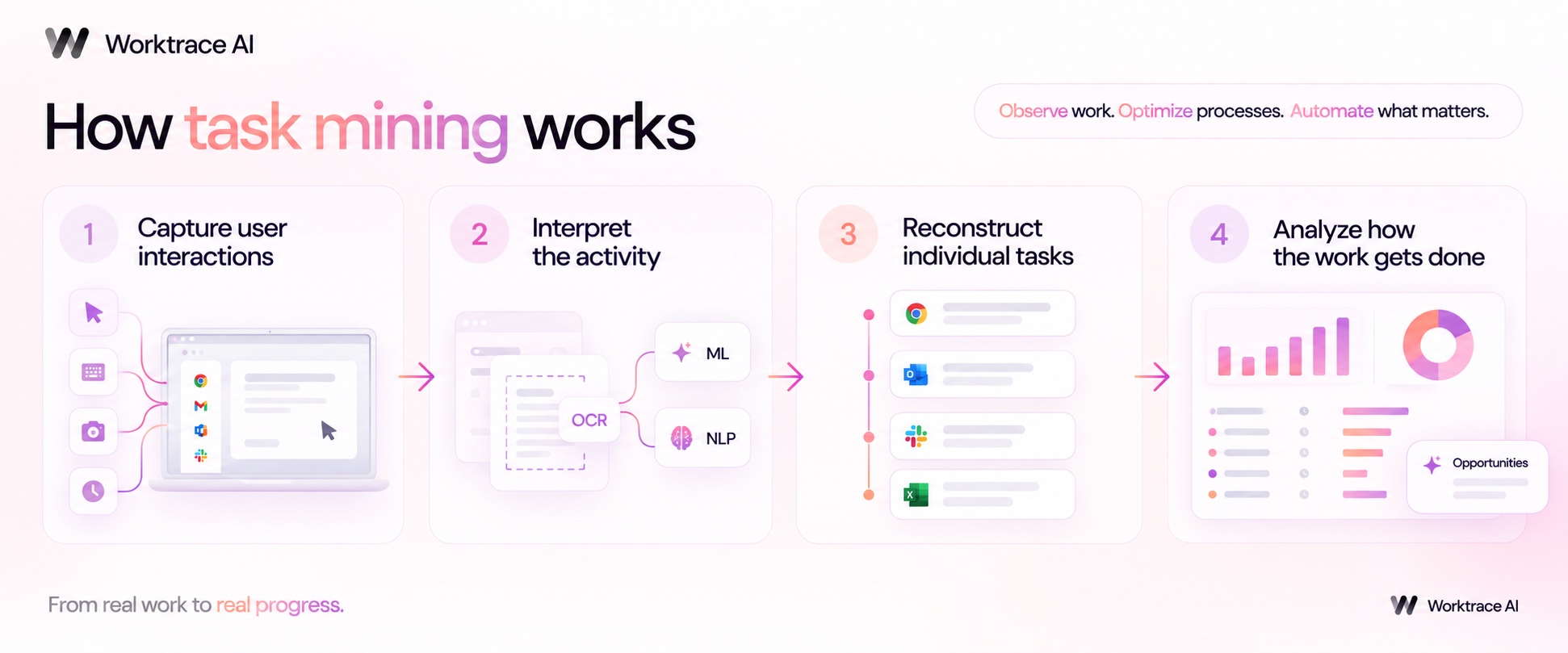
- Capture user interactions: Task mining software collects user interaction data as work happens, including mouse clicks, keystrokes, screenshots, application usage, and timestamps.
- Interpret the activity: Optical character recognition (OCR) extracts text from screenshots, while machine learning and natural language processing (NLP) help identify what users are doing across applications.
- Reconstruct individual tasks: The software groups related interactions into recognizable tasks and maps the sequence of steps users follow to complete them.
- Analyze how the work gets done: Task analysis highlights time spent, task frequency, common variations, repetitive tasks, and bottlenecks that may point to process improvement or automation opportunities.
Most deployments collect data for a defined observation period rather than continuously. The exact output varies by task mining software: some provide task-level metrics and visualizations, while others group activity into broader workflows.
Task mining vs. process mining
Task mining and process mining both support process discovery and process improvement, but they observe work from different vantage points. Simply put:
- Task mining looks at what people do on their desktops.
- Process mining looks at what happens across business systems.
| Task mining | Process mining | |
|---|---|---|
| What it analyzes | Individual tasks and user interactions | End-to-end processes and workflows |
| Where the data comes from | Keystrokes, mouse clicks, screenshots, application usage, and other user interaction data | Event logs from systems such as ERP, CRM, and BPM platforms |
| What it shows you | How people complete a task, step by step, including variations and repetitive work | How work moves between systems, teams, and process stages |
| Level of detail | Desktop and task level | Process and system level |
| Useful for | Task analysis, identifying bottlenecks, standardizing work, and finding automation opportunities | Process mapping, identifying delays and deviations, and improving end-to-end process performance |
| What it can miss | The wider process before and after an individual task | Work that happens outside system event logs, such as activity in email, spreadsheets, or unsupported applications |
For example, take invoice processing in accounts payable. Process mining might show that a purchase order moves from an ERP system to approval and then payment, including where the process slows down. Task mining can show what an employee actually does within one part of that process: opening an invoice, copying data between applications, checking a purchase order, entering data into the ERP, and resolving an exception.
Neither provides the full picture alone. Process mining gives you breadth across the process; task mining gives you depth within the task. Used together, they can provide richer process intelligence by connecting system-level workflows with the human activity happening between them.
One Deloitte case study of a consumer goods company shows the benefit of combining the two. Process mining mapped the Order-to-Cash process through its core systems, while task mining exposed the work happening outside them: only 21% of employee time was spent in SAP, compared with 54% across Microsoft applications. Together, the analysis identified opportunities to reduce total effort by 40%.
What task mining is good at
Task mining is particularly useful when you need to:
- Find repetitive tasks: Identify high-volume, repeatable work that could be a good candidate for automation.
- See how work actually happens: Capture real user interaction data rather than relying on interviews or self-reported workflows.
- Spot bottlenecks: See where individual tasks slow down, create errors, or require unnecessary steps.
- Compare task variations: Understand how different employees complete the same task and where processes deviate.
- Quantify automation opportunities: Measure task frequency, time spent, and other data that can help prioritize process improvement and automation.
That remit is expanding as AI adoption grows. Gartner now positions task mining as a way to uncover AI and AI agent use cases, as well as identify automation opportunities and improve productivity and employee experience. For AI leaders under growing pressure to turn AI investment into measurable business outcomes, task mining can help ground decisions in how work actually gets done.
Where task mining falls short
Task mining can show you where automation opportunities exist, but it doesn't necessarily tell you what to build. Most task mining software surfaces repetitive tasks, bottlenecks, and inefficiencies, but turning those findings into an end-to-end workflow, deciding what should be automated, and creating a build-ready automation specification still requires additional analysis. That work often passes to a separate RPA or automation team working from process maps or static documentation.
There’s also a trade-off in how task mining collects its data. Capturing keystrokes, screenshots, mouse clicks, and application usage can create legitimate employee privacy and data governance concerns. A recent legal overview of employee monitoring risk highlights the regulatory and litigation risks associated with intrusive monitoring, particularly where employees aren't given adequate transparency or consent.
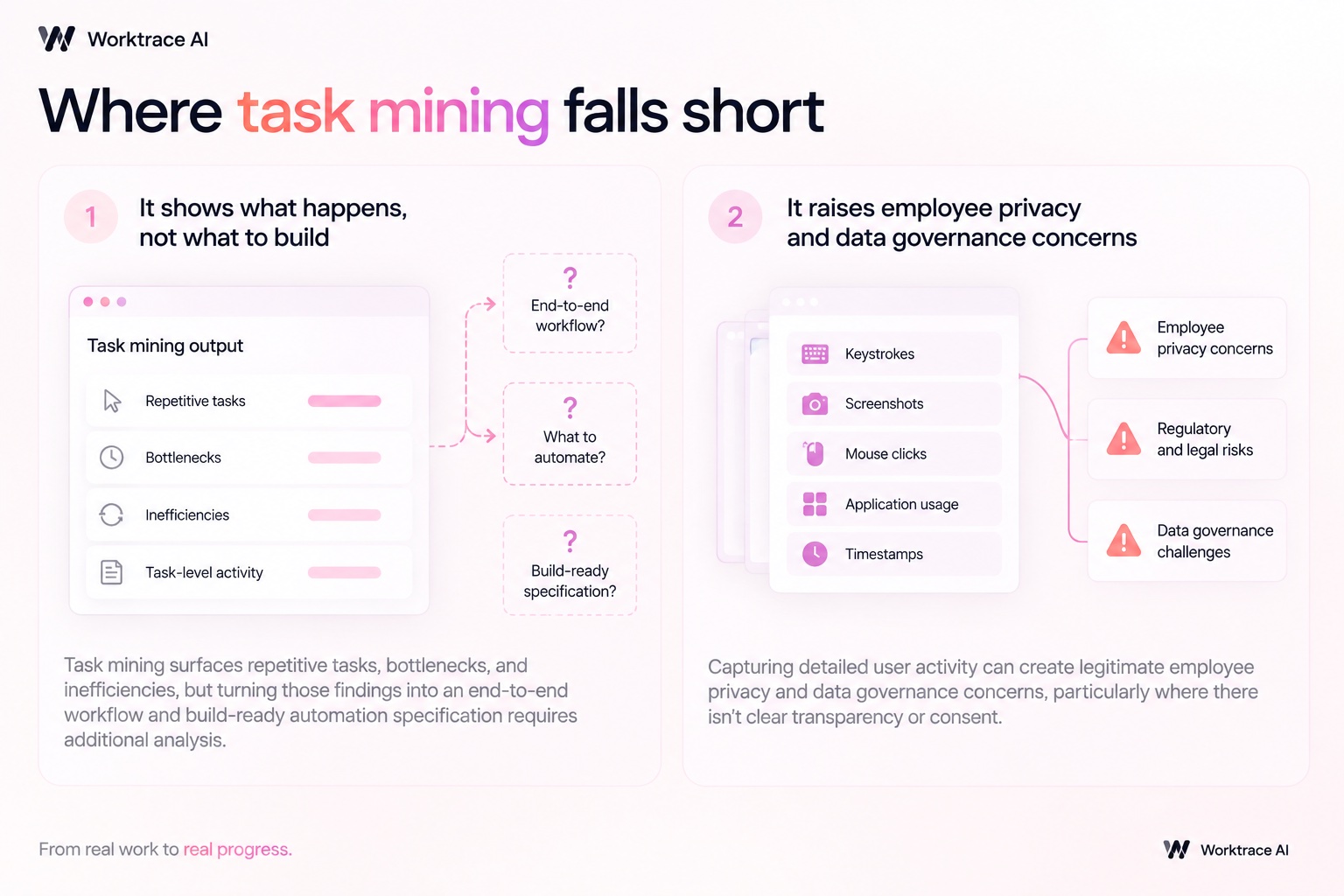
Before deploying task mining software, teams need clear policies around data collection, consent, storage, access, and how employee activity will be used.
How Worktrace AI extends task mining
Worktrace AI starts from the same place task mining does, observing work at the screen level, but is built to close the gaps described above rather than stop at a list of insights.
Three differences stand out:
- Grouping activity into workflows: Task mining typically requires manual curation to turn raw activity into a coherent workflow. Worktrace AI automatically groups observed activity into workflows, capturing the different ways a task gets done, no manual grouping required.
- Turning discovery into something teams can build: Rather than stopping at process maps, Worktrace AI ranks automation opportunities against current AI and automation capabilities, then generates exec-level missions tied to business key performance indicators (KPIs) and build-ready agent specs that are roughly 80% complete.
- Shortening the path to deployment: Worktrace AI’s agent specifications are customized to the tools a team already uses, such as n8n, Microsoft Copilot Studio, or Google Agent space, reducing the manual discovery and specification work required before development begins.
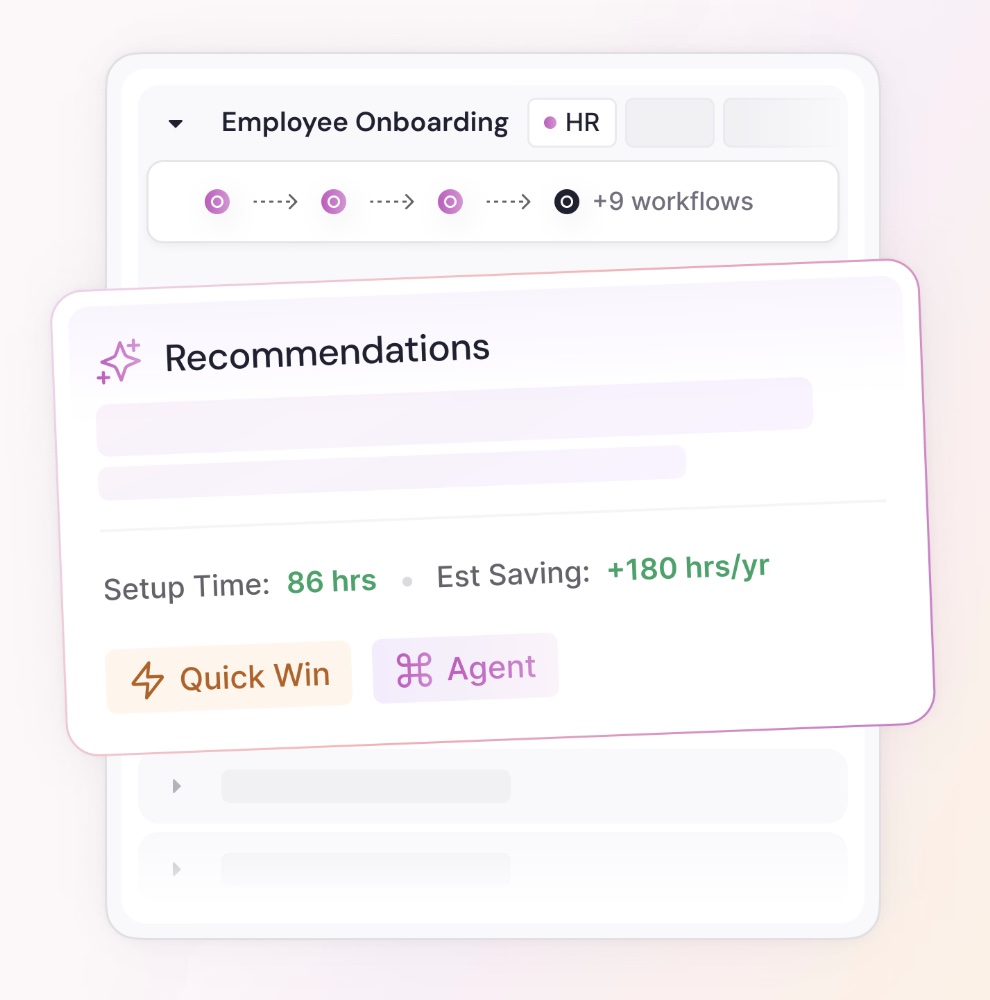
Worktrace AI also requires zero system integrations to start. Its semantic understanding goes beyond recording that a step happened to interpret why it happened, helping teams distinguish repetitive tasks suited to automation from work that requires human judgment or AI agents.
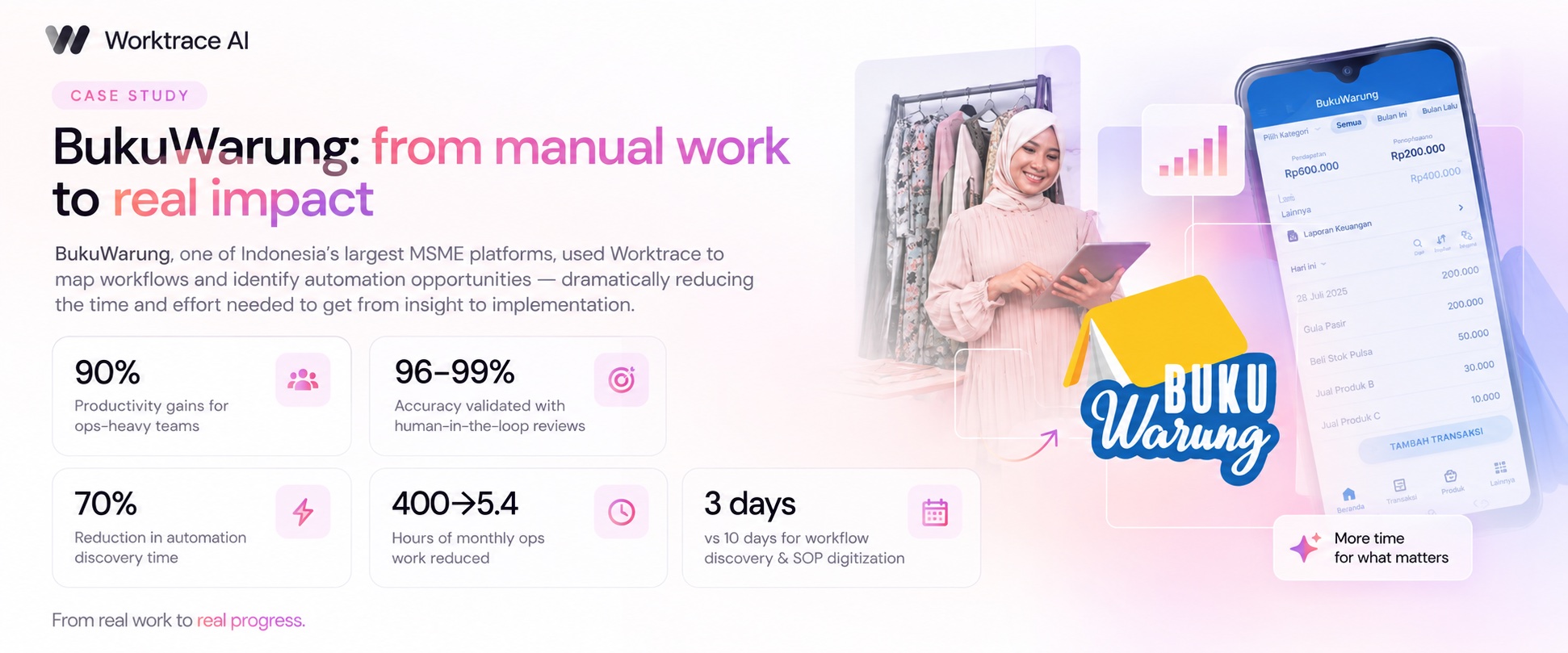
BukuWarung shows how that changes the discovery-to-automation cycle. The fintech company found that discovering automation opportunities and documenting workflows was taking three times longer than developing, testing, and releasing the automations themselves. With Worktrace AI, it cut workflow discovery and SOP (standard operating procedure) digitization for several automations from 10 days to 3 days, with human reviewers validating the resulting workflows at 96–99% accuracy.
Those structural facts, team-level aggregation, no productivity tracking, no keystroke capture, aren't specific to any one industry. They're Worktrace AI's standard approach across every deployment. Its healthcare page lays out the same protections in more detail, plus the on-device redaction of pattern-based personally identifiable information (PII) that regulated teams tend to ask about specifically.
This approach reflects the broader move from RPA to agentic discovery: from finding individual clicks to automate to understanding complete workflows and determining where different forms of automation fit. Worktrace AI’s framework for scoring how automatable a workflow is then helps teams determine how much autonomy each workflow can realistically support.
From task mining to automation
Task mining gives you an evidence-based view of how individual tasks get done. That discovery only pays off once it turns into automation your team can actually build, which is where task mining alone typically stalls, and where Worktrace AI picks up.
Whether you use task mining as a standalone tool or as part of a broader process discovery initiative, the principle is the same: understand how work actually happens before deciding what to automate.
Want to see what task mining looks like without the setup lift? Request a Worktrace AI demo and get a mapped view of your team's real workflows within a week.
FAQs about task mining
What is task mining used for?
Task mining is used to identify individual, repetitive tasks worth automating by capturing actual desktop activity, keystrokes, clicks, and screen content, rather than relying on interviews or self-reported process descriptions. It's commonly used for process discovery, process improvement, and identifying automation opportunities for RPA (robotic process automation) and other forms of automation.
Is task mining the same as process mining?
Task mining is not the same as process mining. Task mining captures individual tasks at the desktop level, what one person did, click by click. Process mining reconstructs end-to-end workflows by analyzing event logs from the systems a process runs through. Task mining provides task-level detail; process mining provides a broader view of how work moves across systems. They can be used together to build a more complete picture of a business process.
Does task mining raise privacy concerns?
Task mining can raise privacy concerns if user interaction data isn't collected and managed carefully. Because task mining captures keystrokes, clicks, and screen content at the individual level, it can raise employee privacy and data governance concerns. Organizations should understand what data is collected, how it's stored, who can access it, and whether personal information is redacted before deploying task mining software.
Read more

October 20, 2026
Process Intelligence explained
Most AI transformation mandates start with what to automate. Process intelligence answers the question that comes first: how does work actually happen today, and how could it work better?


Agents you'll actually use
Worktrace discovery maps exactly how your team works and finds the most repetitive work. Then it builds Al agents that do that work.
We'll get in touch with you shortly.




of enterprise work is automatable