November 18, 2026
How to measure AI ROI, and why it starts before you build
Most AI ROI calculations fail before launch. Learn how to calculate AI ROI, which costs teams miss, and why a real baseline of the work comes first.


More than half of CEOs (56%) say AI has delivered neither higher revenue nor lower costs for their company over the past year, according to PwC's 29th Global CEO Survey. Only one in eight report both. For a VP or Head of AI, that number lands as a question from the board: what is our AI program actually returning?
The instinct is to treat that as a measurement problem and reach for better dashboards. But you can't measure productivity gains, cost savings, or return on investment against a baseline that doesn't exist.
Too often, organizations select AI use cases based on instinct, invest in automation, and only then ask what the work used to cost. Without a real "before," no "after" can prove anything.
What is AI ROI?
AI return on investment (ROI) compares the financial value an AI initiative delivers with the total cost of building, deploying, and running it.
Here’s the formula to work it out:
AI ROI = (Total financial benefits − Total cost) ÷ Total cost × 100
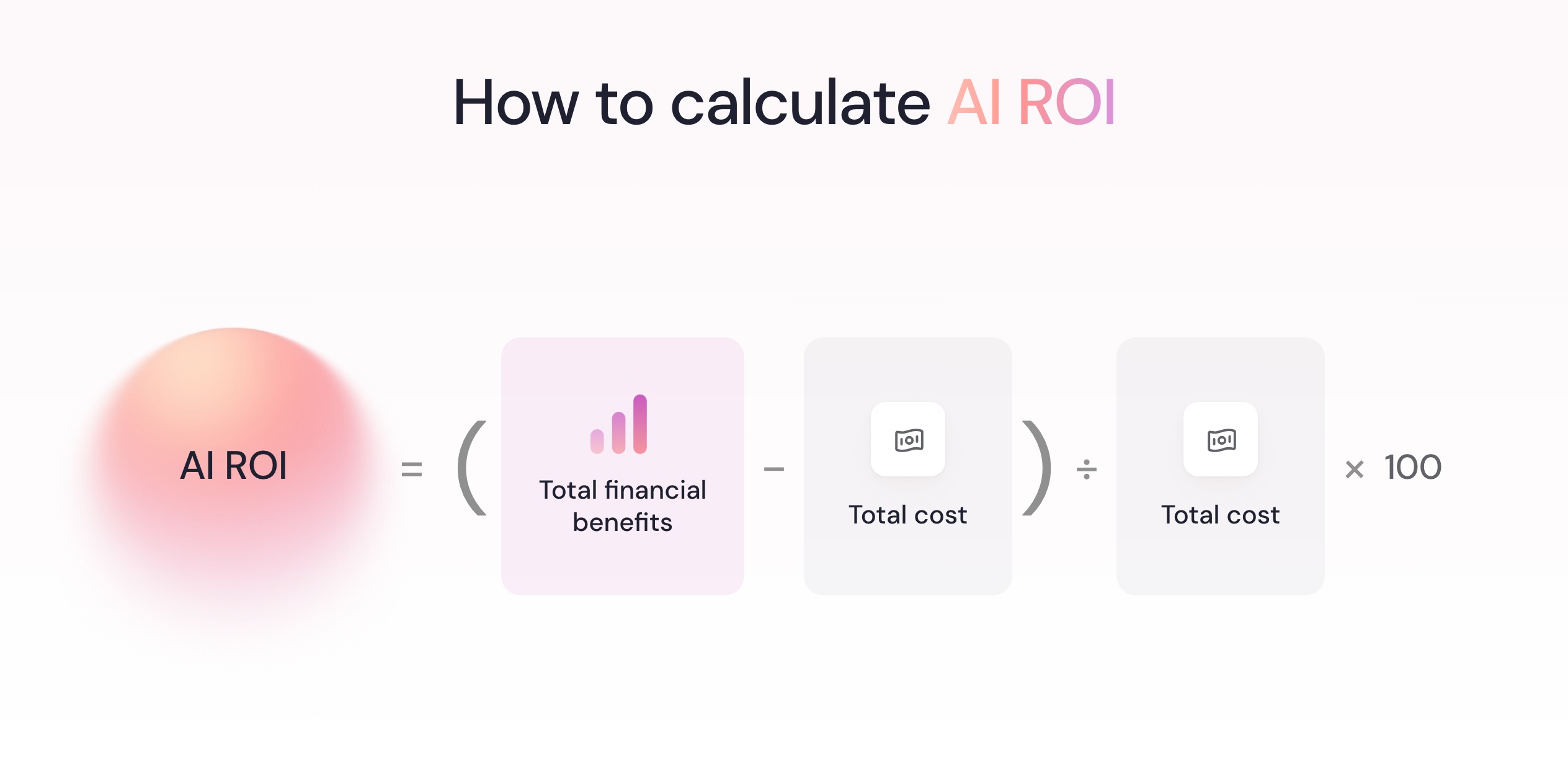
Total financial benefits include the measurable savings and additional profit attributable to AI. A positive ROI means those benefits exceed the total investment.
AI ROI is harder to calculate because benefits extend beyond individual workflows, while costs include integration, oversight, and ongoing maintenance. And operational improvements aren't necessarily financial returns: time saved only creates measurable financial value when it reduces costs, avoids future spending, or generates additional profit.
How to calculate AI ROI
Calculating AI ROI requires reliable benchmarks, complete costs, and measurable benefits. Here’s how to put these factors together.
AI ROI calculation example using the basic formula
Start with three numbers for a single use case: the annual value of the benefit, the one-time cost to build and deploy, and the annual cost to run.
Take this hypothetical example.
- An invoice-exception workflow consumes 1,200 hours a month across an accounts payable team.
- An agent handles 60% of that volume, freeing 720 hours a month, or 8,640 hours a year.
- At a fully loaded cost of $55 an hour, that's roughly $475,000 in potential annual labor capacity.
- If the agent costs $150,000 to build and $90,000 a year to run, first-year ROI could reach 98%, with a payback period of approximately 4.7 months, assuming benefits accrue evenly, operating costs are spread across the year, and the full value of freed capacity is realized.
That math is simple. But it relies on two assumptions:
- You know exactly how much time the work took before automation.
- Every hour saved is worth $55 to the business.
Unless those hours reduce costs, avoid hiring, or generate additional profit, $475,000 is potential capacity, not realized financial return.
Costs teams often miss
The subscription is rarely the whole bill. Total cost of ownership (TCO) also includes the people, systems, and ongoing work needed to keep an AI solution running.
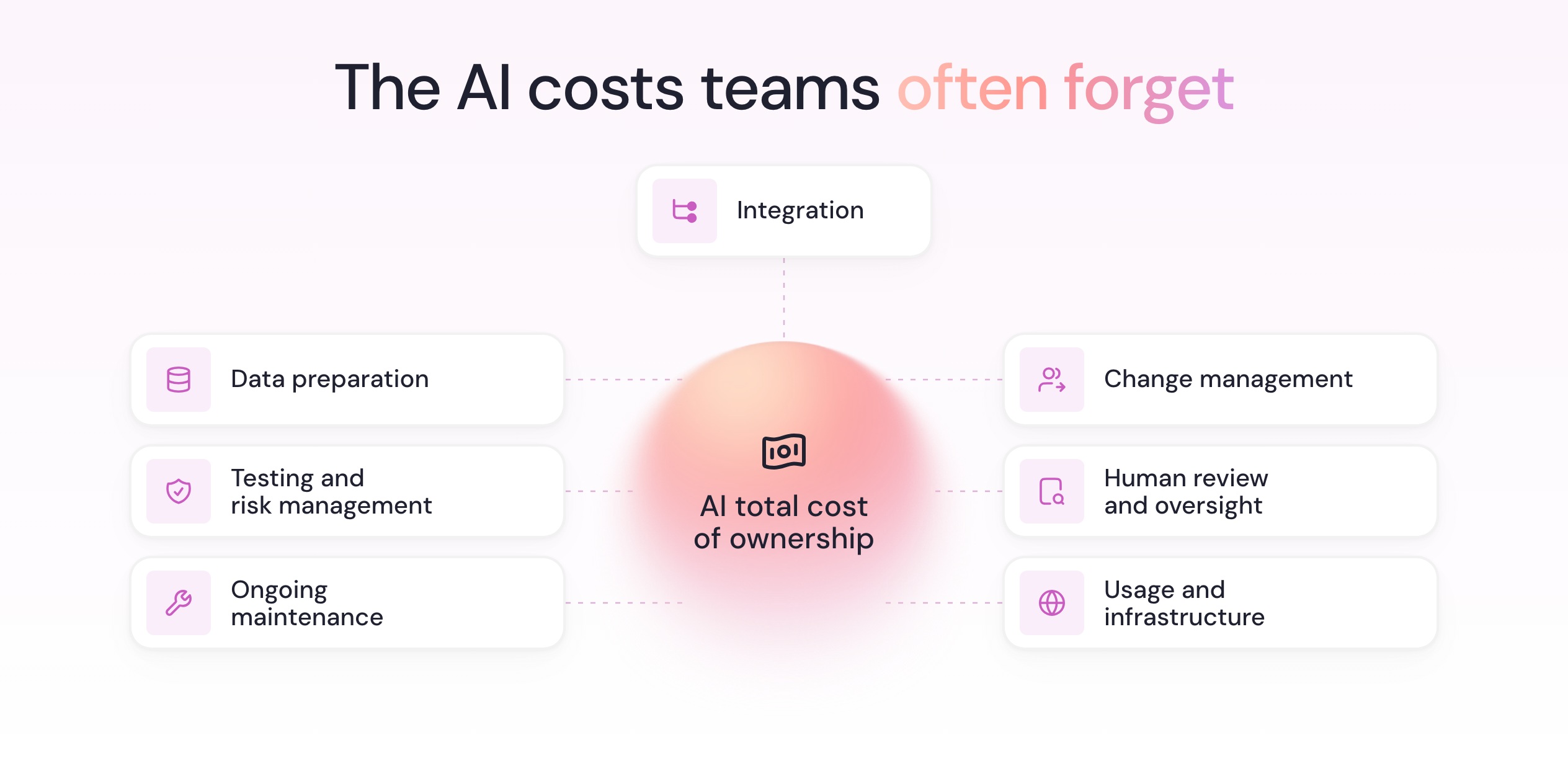
- Integration: Connecting the agent to the systems, credentials, and internal APIs it needs to act.
- Data preparation: Ensuring data quality through cleaning, organizing, and securing the data AI tools need to produce reliable results.
- Change management: Training, communication, and the productivity dip while teams adjust.
- Human review and oversight: Checking outputs, handling exceptions, and approving actions.
- Testing and risk management: Checking accuracy, security, compliance, and reliability before deployment and as the system changes.
- Ongoing maintenance: Updating prompts and workflows, troubleshooting, and monitoring performance.
- Usage and infrastructure: Model API calls, computing resources, storage, and other operational costs that can increase as usage grows.
Benefits worth counting
AI can generate value through cost savings, additional capacity, faster operations, and better business outcomes. The challenge is assigning a credible value to each improvement without counting the same benefit twice.
- Revenue growth: Additional sales, higher conversion rates, or improved customer retention attributable to AI. Measure the additional profit generated, rather than treating all increased revenue as a financial return.
- Time returned: Hours freed from repetitive work, measured against what the work actually took before. Calculate the value of that time through reduced labor costs, avoided hiring, or additional work completed, rather than assuming every hour saved is money earned.
- Cycle time: Faster case resolution can improve operational efficiency, reduce backlogs, and increase throughput. Measure the impact on costs, output, or service levels.
- Error rates: Fewer rework loops, exceptions, and corrections downstream. Calculate the cost of errors avoided, including employee time, refunds, penalties, and wasted resources.
- Output quality: More accurate, complete, or consistent work, even when processing time stays the same. Measure improvements through quality scores, first-pass acceptance rates, or the amount of work requiring revision.
- Customer satisfaction: Better customer engagement through faster, more consistent service. Track satisfaction, retention, and repeat purchases to assess longer-term revenue impact.
- Risk reduction: Fewer fraud incidents, compliance failures, or costly operational disruptions. Estimate the financial value using historical incident rates, average losses, and the reduction in risk.
Why most AI ROI calculations fall apart
Four mistakes can undermine AI ROI before the first agent goes live.
- The baseline is a guess. Surveys, interviews, and manager estimates often miss how long tasks take, how frequently exceptions occur, and how workflows actually operate. Comparing AI performance against an unreliable baseline makes the resulting ROI difficult to defend.
- The use case is the wrong one. An agent saving two hours a week can cost more to maintain than it returns. Meanwhile, the workflows consuming hundreds of hours across a team remain untouched because nobody measured them.
- The costs are underestimated. An AI pilot may look profitable when the calculation includes only development and licensing. But integration, data preparation, human oversight, and ongoing maintenance can substantially increase the total cost of ownership, particularly as AI adoption scales.
- The benefits never materialize financially. Forecasting 1,000 hours saved means little if adoption is low, human review remains necessary, or freed capacity generates no financial value.
How to measure AI ROI, step by step
Measuring AI ROI accurately means starting before implementation, then tracking what changes, what it costs, and what value the business actually realizes.
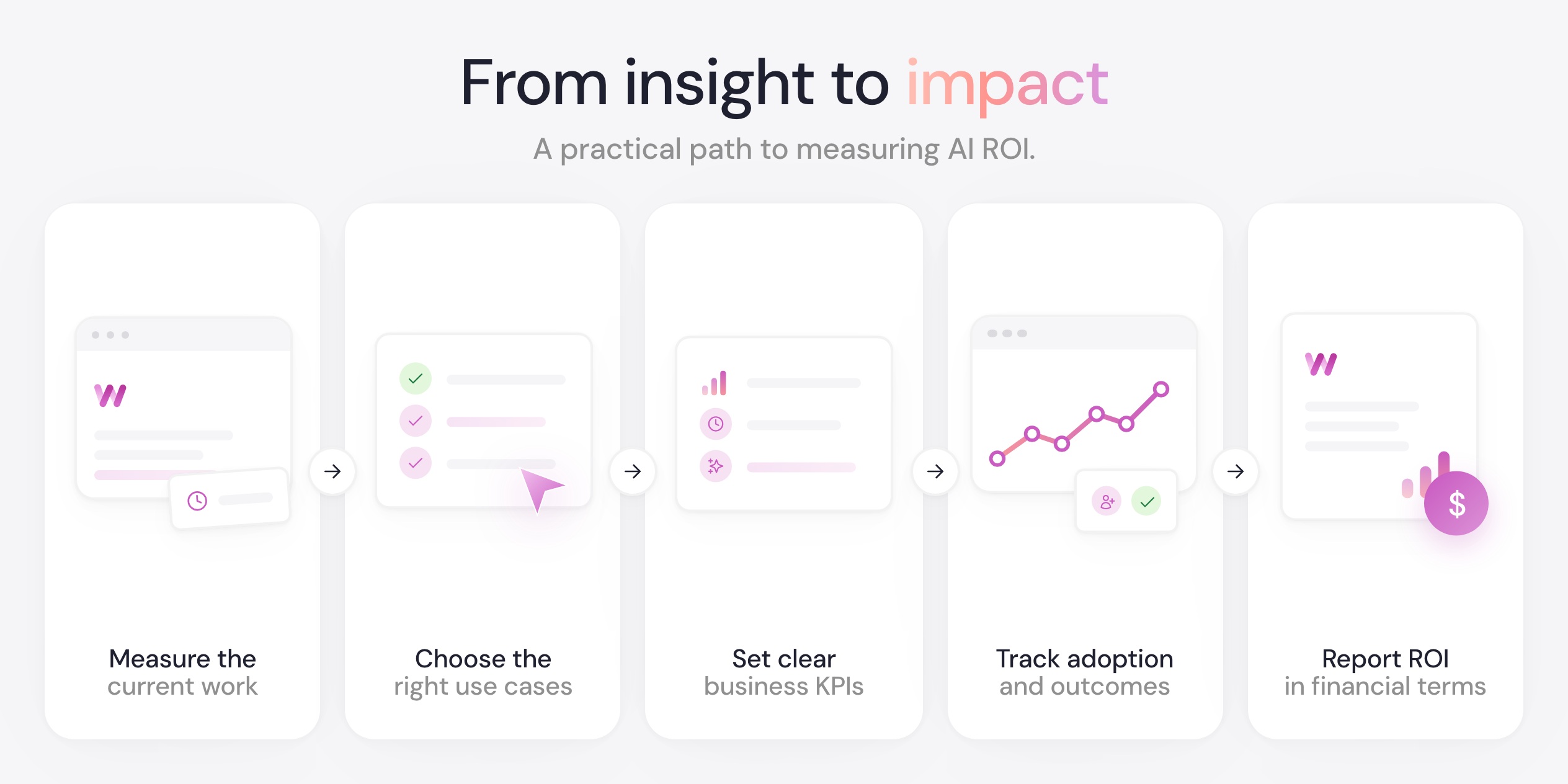
Measure how work happens before you build
According to NVIDIA's 2026 State of AI reports, 30% of respondents identified unclear AI ROI as a major challenge. And how can you defend a return when you don't know what the work cost before automation?
Measure the work itself, not people's recollection of it. Capture workflow frequency, duration, participants, tools, and variations across the team, not one person's walkthrough. Record time, cost, output, and quality benchmarks before implementation.
Choose use cases by measured time and ROI, not instinct
NVIDIA's 2026 State of AI reports found that companies see considerable ROI from highly targeted AI applications that focus on a specific business improvement. Targeted doesn't mean small, though: the use case still needs enough volume to cover what it costs to build and run.
With a real baseline, use-case selection becomes a ranking exercise instead of a pitch contest. Compare time consumed, automation potential, and implementation effort.
Worktrace AI's framework for deciding how automatable a workflow is offers one structured way to make that call.
Take Delhivery, for example. Internal AI hackathons had teams enthusiastically pitching automations based on gut feel. Once workflow data was available, the conversation changed. Teams could point to actual hours and steps, and the top three automation opportunities turned out to cover more than 25% of tracked time.
Define the business KPIs that matter, not just hours saved
AI ROI requires measuring business outcomes, not just whether the technology works. For example, as Deloitte's State of Generative AI in the Enterprise report found, while 54% of organizations were pursuing productivity and efficiency gains through generative AI, only 38% were monitoring changes in employee productivity.
Before building, choose one or two key performance indicators (KPIs) per use case, such as cost per case, error rates, or customer response times. Establish their baseline values and measure whether AI improves them.
Track adoption and outcomes after launch
An agent nobody uses returns nothing. After launch, track how much of the eligible volume actually flows through the agent, how often humans override or correct it, and how the KPIs you defined are moving. Compare against the baseline, not against expectations.
Measure the results over time, too. Early productivity gains may disappear if exception handling increases, while benefits such as improved customer retention can take longer to emerge. Both affect the return on investment.
Report ROI in CFO-ready terms
Give finance the numbers it can actually use. In the same Deloitte survey, only 16% of organizations were producing regular reports for the CFO on the value generated by generative AI. Report total cost of ownership, annual financial benefits, and payback period, distinguishing measured results from estimates.
Separate realized savings and profit from the potential value of freed employee capacity so finance can judge whether further investment is justified.
How Worktrace AI helps you measure AI ROI
Worktrace AI is a workflow discovery platform, and its job starts exactly where most ROI calculations fail: the baseline.
A lightweight desktop app observes how teams work across their tools, without integrations. A focused two-week snapshot, not continuous monitoring, establishes the baseline without a months-long discovery project. Insights are aggregated at the team level, with no individual productivity tracking, and personal information is filtered before analysis.
It then turns that workflow data into the evidence teams need to evaluate AI investments:
- Establish a reliable baseline: Worktrace AI interprets on-screen activity to capture workflow steps, decisions, exceptions, and time spent. It combines repeated tasks across employees into process maps based on observed data rather than estimates.
- Identify the highest-value AI opportunities: Worktrace AI ranks automation opportunities by time savings, the business KPIs your team specifies, and implementation effort. This helps teams prioritize use cases with the strongest potential return on investment.
- Get a working agent: Each opportunity becomes a computer-use agent that runs in a live virtual environment, using the same applications your team uses. Agents are tested against real recorded work before handover, and you can watch them run and track the time they return.
- Find improvements that don't require AI: The same workflow data reveals process inefficiencies that can be addressed without building or maintaining an AI agent, helping teams avoid unnecessary investment.
At BukuWarung, that approach turned workflow data into actionable insights within a week and cut the time to discover workflows and digitize standard operating procedures (SOPs) from 10 days to 3 days per automation. With workflows validated at 96–99% accuracy through human-in-the-loop review, BukuWarung reduced 400 hours of monthly operations work to 5.4 hours.
AI ROI is decided before the first agent is built
The biggest AI ROI decision often happens before a single agent is built: choosing which work deserves automation in the first place. Measurement after launch can only confirm whether that choice, and the baseline behind it, was right. It’s the same logic behind the shift from RPA to agentic discovery and the Chief AI Officer mandate: evidence first, investment second.
That’s why the baseline and the agent belong in the same process.
Worktrace AI measures the work before anything is built, ranks the workflows by the hours and dollars they consume, builds agents for the ones worth automating, then measures the same work again the same way. The return is mapped out before the build and confirmed after it, against a number your finance team can check.
Most AI ROI problems start at selection, not measurement. Request a Worktrace AI demo and see your highest-ROI opportunities ranked against a real baseline of where your team's time goes.




Frequently asked questions
Read more

November 12, 2026
How PII redaction works in AI automation
How PII redaction protects sensitive data in AI automation, from detection techniques to where redaction fits in the pipeline, and how Worktrace masks data before analysis.


Ready to evaluate the results?

Agents you'll actually use
Worktrace discovery maps exactly how your team works and finds the most repetitive work. Then it builds Al agents that do that work.
We'll get in touch with you shortly.





of enterprise work is automatable