November 18, 2026
Process mining vs. task mining: What each one misses
Process mining reads system logs, task mining records clicks. Compare how they differ, what each one misses, and how to choose the right approach for AI agents.

Ask a process mining vendor whether you need task mining, and they'll probably tell you to use both. Ask a task mining vendor, and you'll likely get the same answer.
It's reasonable advice. But if your goal is to identify which business processes AI agents can take over, combining two technologies doesn't necessarily give you the answers you need.
The real question in process mining vs. task mining is what each approach can actually tell you about how work gets done, what remains invisible, and whether you have enough information to make the right automation decisions.
What is process mining?
Process mining reconstructs how a business process runs by analyzing event logs from the systems where work gets recorded, such as enterprise resource planning (ERP) and customer relationship management (CRM) platforms.
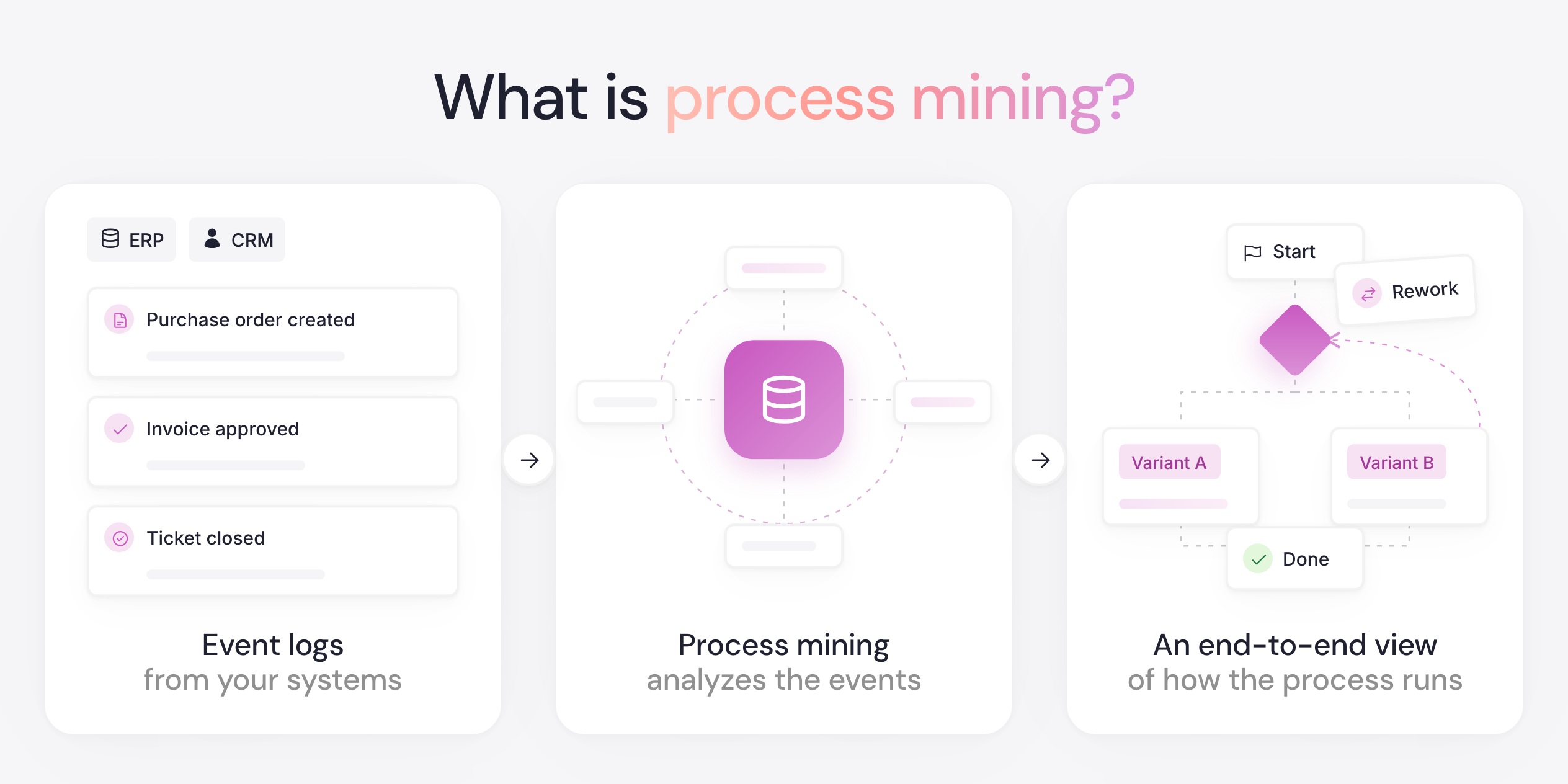
Every time a purchase order is created, an invoice is approved, or a ticket is closed, the system may record an event with a timestamp and an identifier that can be mapped to a case ID. Process mining stitches those events together into an end-to-end picture of how cases actually move. Celonis and SAP Signavio are well-known examples.
Process mining supports process improvement in four key ways:
- End-to-end flow: The real path cases take, including variants, loops, and rework.
- Throughput: Cycle times and the waiting time between steps.
- Bottlenecks: Where cases pile up, how long they wait, and where delays occur.
- Conformance: Where the process as it runs deviates from the process as it was designed.
It's strongest when a process lives mostly inside a handful of well-instrumented systems.
What is task mining?
Task mining captures user-level desktop activity, including mouse clicks, application switches, copy-and-paste actions, and, in some tools, keystrokes and optical character recognition (OCR) of on-screen content.
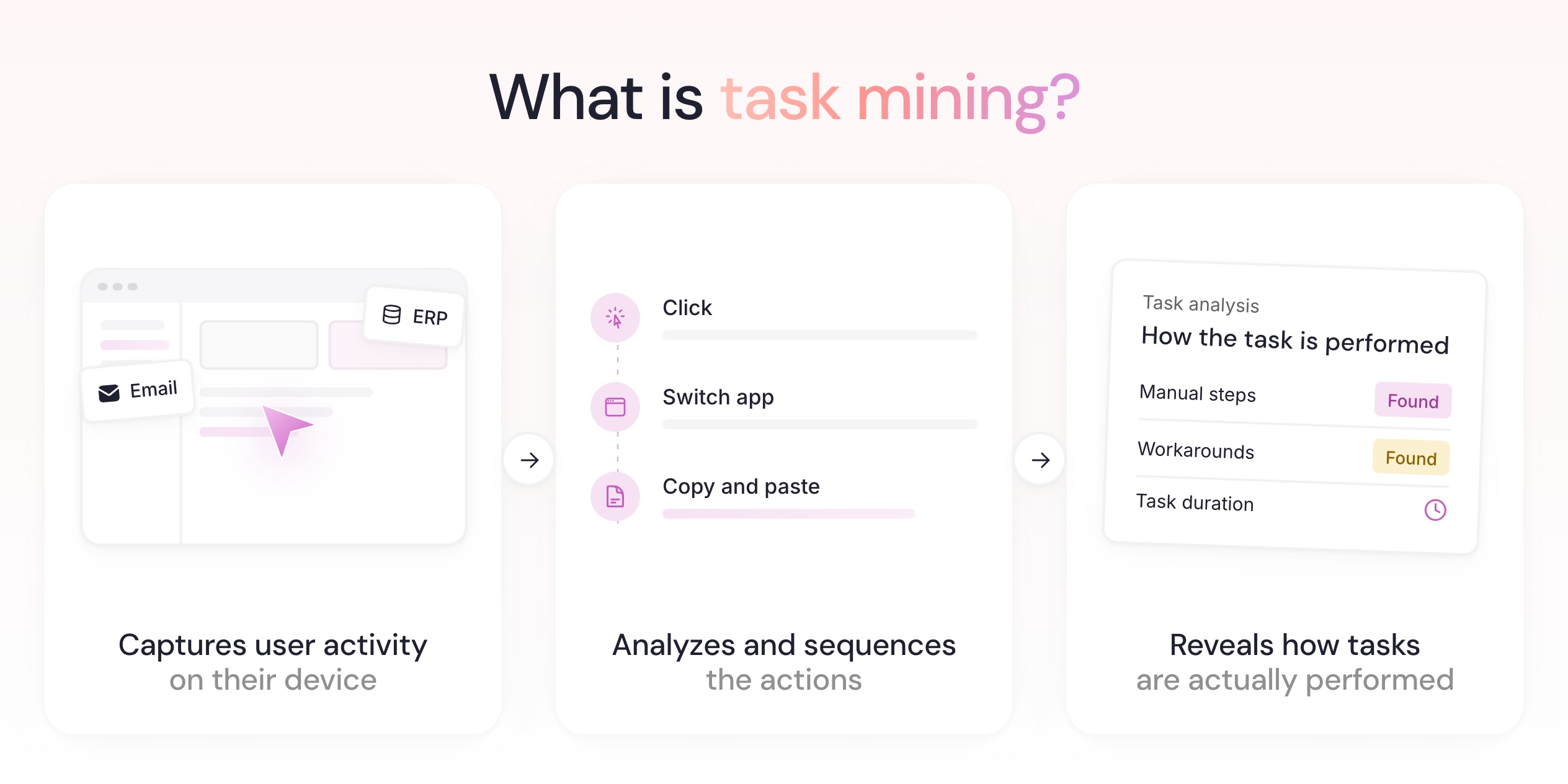
Task mining software typically uses a recorder installed on employee devices to collect user interaction data, revealing how specific tasks are performed rather than how transactions move through IT systems. Mimica, Skan AI, and Soroco are examples of task mining solutions, while some process mining vendors offer task mining alongside their core platforms.
Task mining is particularly useful for identifying manual steps, workarounds, repeated data entry, and application usage that system event logs don't capture. By analyzing these interactions, businesses can uncover inefficiencies, measure task duration, and identify repetitive workflows that may be suitable for robotic process automation (RPA) or other process improvement initiatives.
Process mining vs. task mining: key differences
Process mining tracks how business processes move through systems, while task mining examines how people complete individual tasks. Both support process improvement at different levels.
| Process mining | Task mining | |
|---|---|---|
| Data source | Event logs from ERP, CRM, and other systems | Desktop activity, including clicks, app switches, and screen content |
| Scope | End-to-end workflows across multiple cases | Individual tasks and user interactions |
| Setup | Access to event data, extraction, and mapping | Desktop recording software and capture configuration |
| What it reveals | Process flows, cycle times, bottlenecks, and deviations | Manual steps, workarounds, repetitive actions, and task duration |
| What it misses | Work outside connected systems | Context and reasoning not evident from recorded actions |
| Privacy considerations | Case-level records that may contain employee identifiers | User-level activity that requires careful monitoring controls |
Data source
Process mining uses system-generated event logs. These record transactions and changes in business applications, such as when an order is placed, approved, or fulfilled.
Task mining uses desktop interaction data. Depending on the tool, this can include mouse clicks, application switches, screenshots, and on-screen text. It captures activity that may never appear in a system log, such as checking an email before updating an ERP record.
Scope and level of detail
Process mining provides a broader process view. It can analyze thousands of invoices to identify recurring delays, process variations, and bottlenecks across an accounts payable workflow. However, it cannot directly observe manual work between recorded events.
Task mining provides the closer task-level view. It can reveal how employees reconcile invoices, switch between applications, and repeatedly enter the same information. But understanding how representative those interactions are across a team requires sufficient observations and analysis.
Setup and integration requirements
Process mining depends on accessible, usable event data. Organizations must extract event data from IT systems, reconcile identifiers, and map workflows. Complex processes may require substantial data engineering.
Task mining typically avoids those system-level integrations. Instead, organizations deploy recording software, select the teams and applications to observe, and configure capture and privacy controls. This can reduce dependence on backend integrations, but deployment and data governance still require planning.
Privacy considerations
Process mining primarily analyzes transaction records, although event logs can contain employee identifiers and other personal data. Access controls, data minimization, and appropriate governance still apply.
Task mining captures activity at the individual user level, creating additional employee-monitoring considerations. Some task mining solutions record keystrokes or screenshots, making it important to understand exactly what is collected, masked, and retained.
These considerations can carry legal obligations. For example, New York requires certain private employers to provide notice of electronic monitoring. Connecticut and Delaware also have employee-monitoring notification laws, although requirements vary by state.
Evaluate each vendor's application allowlists, masking, pause controls, and data retention policies.
What are the limitations of process mining and task mining?
Process mining and task mining reveal inefficiencies, bottlenecks, and automation opportunities. Even combined, they may miss the context, exceptions, and human judgment behind decisions.
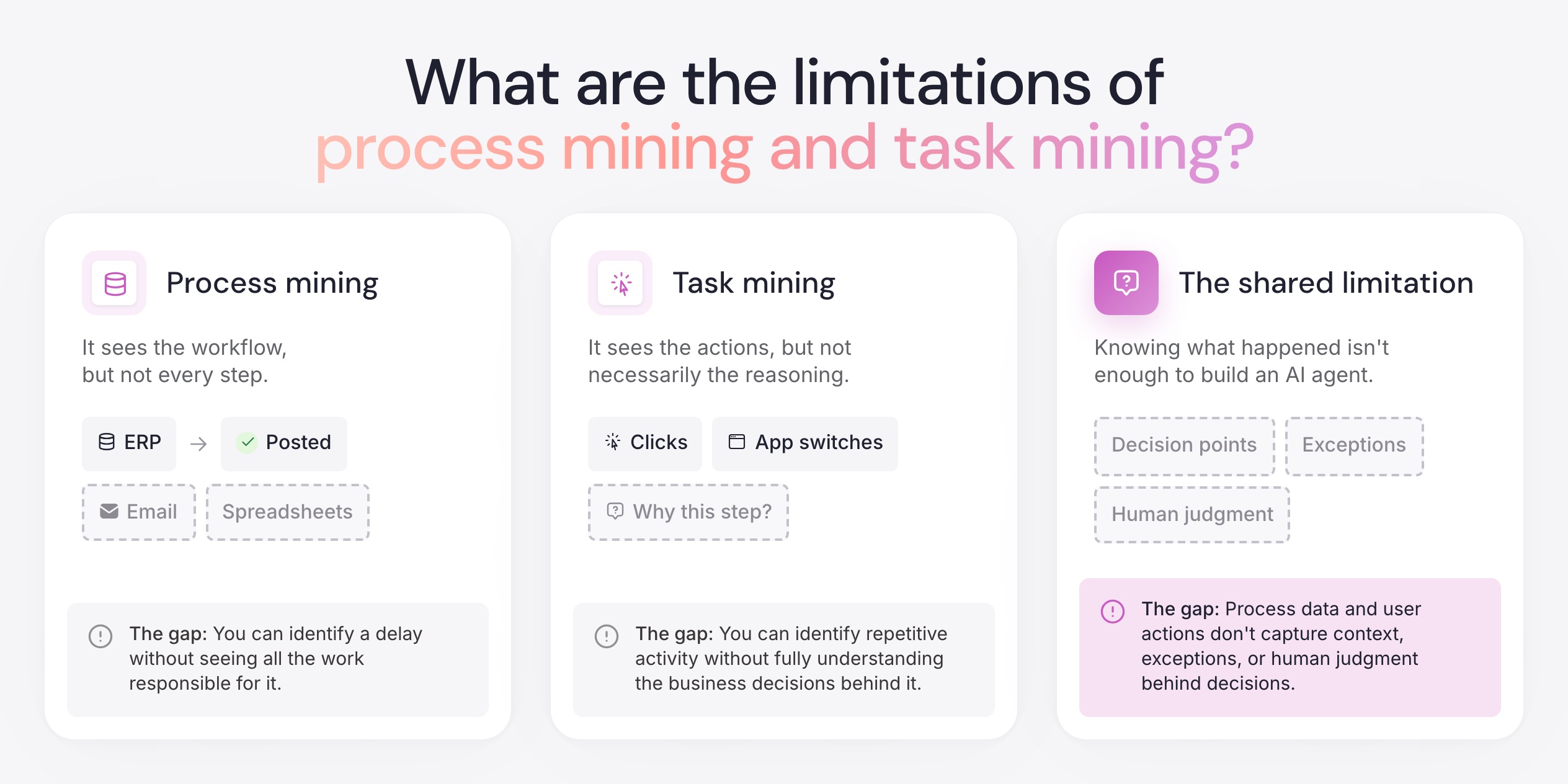
Consider an accounts payable employee handling an exception invoice. They receive it by email, check the vendor record in the ERP, reconcile line items in a spreadsheet, message procurement for clarification, and finally post the invoice.
Process mining: it sees the workflow, but not every step
Process mining can identify when the invoice entered the system, when it was posted, and how long the process took. But unless the other activities generate accessible, connected event logs, the work happening in email, spreadsheets, and chat remains invisible.
The gap: You can identify a delay without seeing all the work responsible for it.
Task mining: it sees the actions, but not necessarily the reasoning
Task mining can capture application switches, repeated data entry, and time spent reconciling information. It may show that an employee repeatedly checks the same spreadsheet, but not establish whether they're investigating a missing purchase order, applying a vendor-specific rule, or making a judgment that requires human oversight.
Research published in Information Systems in 2024 highlights a related limitation. Recording what someone clicks or types doesn't automatically tell you which task they're working on or how those actions fit into the wider process. Making those connections requires further analysis.
The gap: You can identify repetitive activity without fully understanding the business decisions behind it.
The shared limitation: knowing what happened isn't enough to build an AI agent
For process automation, identifying repetitive steps may be sufficient. But AI agents that handle exceptions, make decisions, and work across multiple applications need more context:
- Decision points: What determines the next action?
- Exceptions: What changes when the standard process doesn't apply?
- Human judgment: Which decisions require review, approval, or escalation?
- Process variations: How does the work differ across employees, teams, and systems?
- Automation readiness: Which steps can an agent perform reliably, and which require human oversight?
Getting these decisions wrong has consequences. Gartner estimates that over 40% of agentic AI projects will be abandoned by the end of 2027, citing escalating costs, unclear business value, and inadequate risk controls.
Successful AI automation depends on understanding how work happens, which tasks AI can reliably handle, and where human judgment and oversight are needed. The Chief AI Officer mandate, breaks down why identifying the right opportunities is a critical step.
A third option: screen-level workflow discovery
Screen-level workflow discovery uses vision-based AI to interpret activity, decisions, and exceptions across applications, without relying on event logs or backend integrations. It offers two capabilities:
- Cross-application visibility: Captures workflows across tools without requiring integrations, including applications without APIs.
- Contextual understanding: Interprets what's on screen to understand why an action was taken, not just that it happened, so it can distinguish repetitive steps from ones that need human judgment.
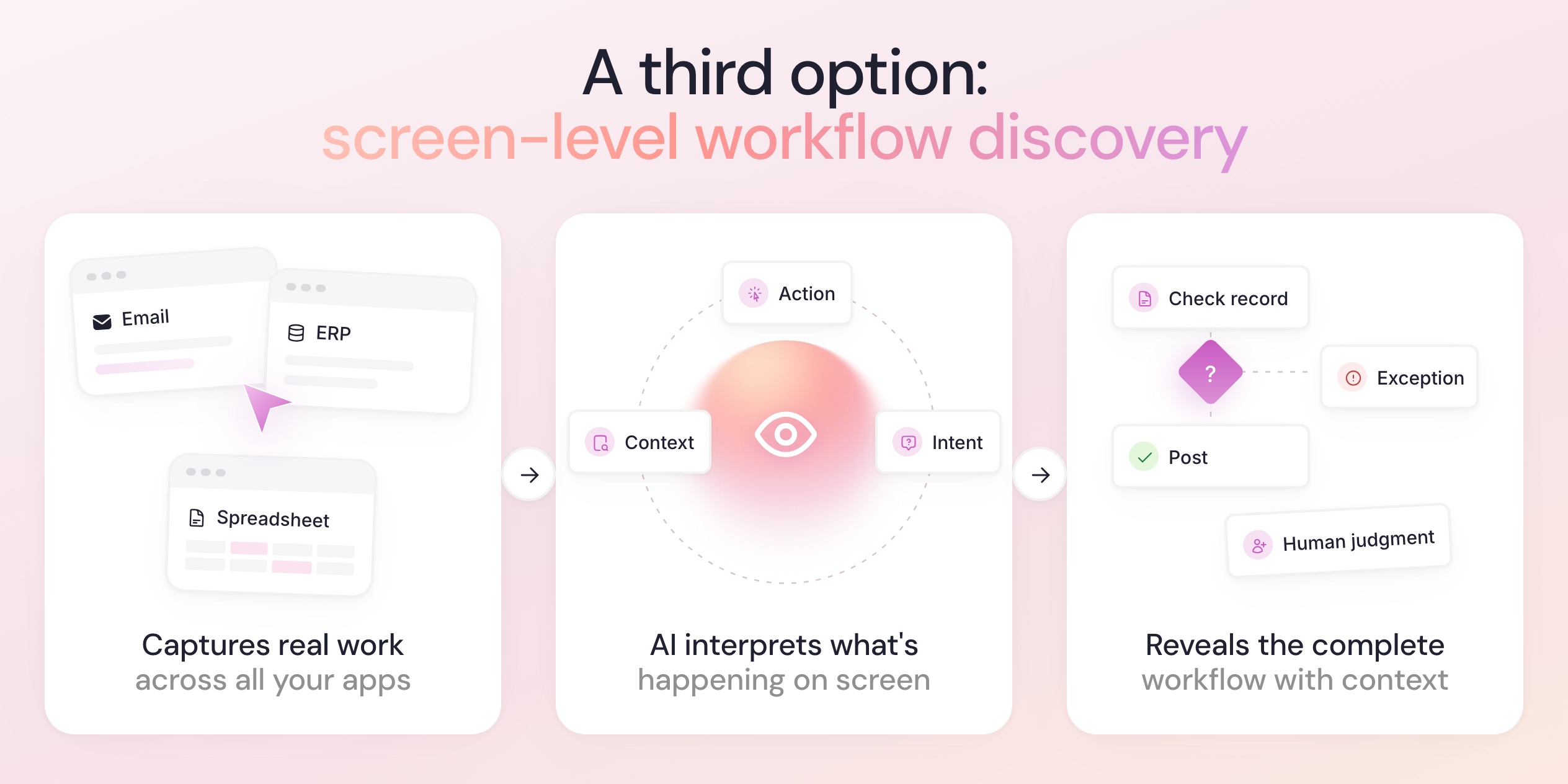
It represents another step in the evolution of process intelligence, from scripted robotic process automation (RPA) to system-level analysis and AI-powered workflow discovery. Worktrace AI explains this progression in the evolution from RPA to agentic discovery.
How Worktrace AI turns workflow discovery into automation opportunities
Worktrace AI applies screen-level workflow discovery to capture how teams work and turn those observations into actionable process intelligence. Its capabilities include:
- Two-week snapshot: A lightweight desktop application observes real work during a focused two-week period, without continuous monitoring or system integrations.
- Privacy-first data collection: Captures on-screen activity without recording keystrokes, passwords, or API keys. IT teams control application access through allowlists and denylists, while personal information is filtered before analysis.
- Team-level insights: Aggregates observations across employees to understand shared workflows, without tracking individual productivity.
- Variation-aware process maps: Combines repeated workflows into process maps showing different tools, steps, decision points, and exceptions across a team.
- Automatically generated SOPs: Creates standard operating procedures based on observed work, including variations and edge cases.
- Prioritized automation opportunities: Identifies and ranks potential use cases based on estimated time savings, business-defined key performance indicators (KPIs), and implementation effort.
- Ready-to-run computer-use agents: Turns each opportunity into an agent that works in a live virtual environment, using the same applications your team uses, and in the same way.
- Deployment and visibility: Agents run with your team’s access and permissions, and you can watch them work and track the time they save. Automations can also be exported to platforms like n8n, OpenAI, and CrewAI.
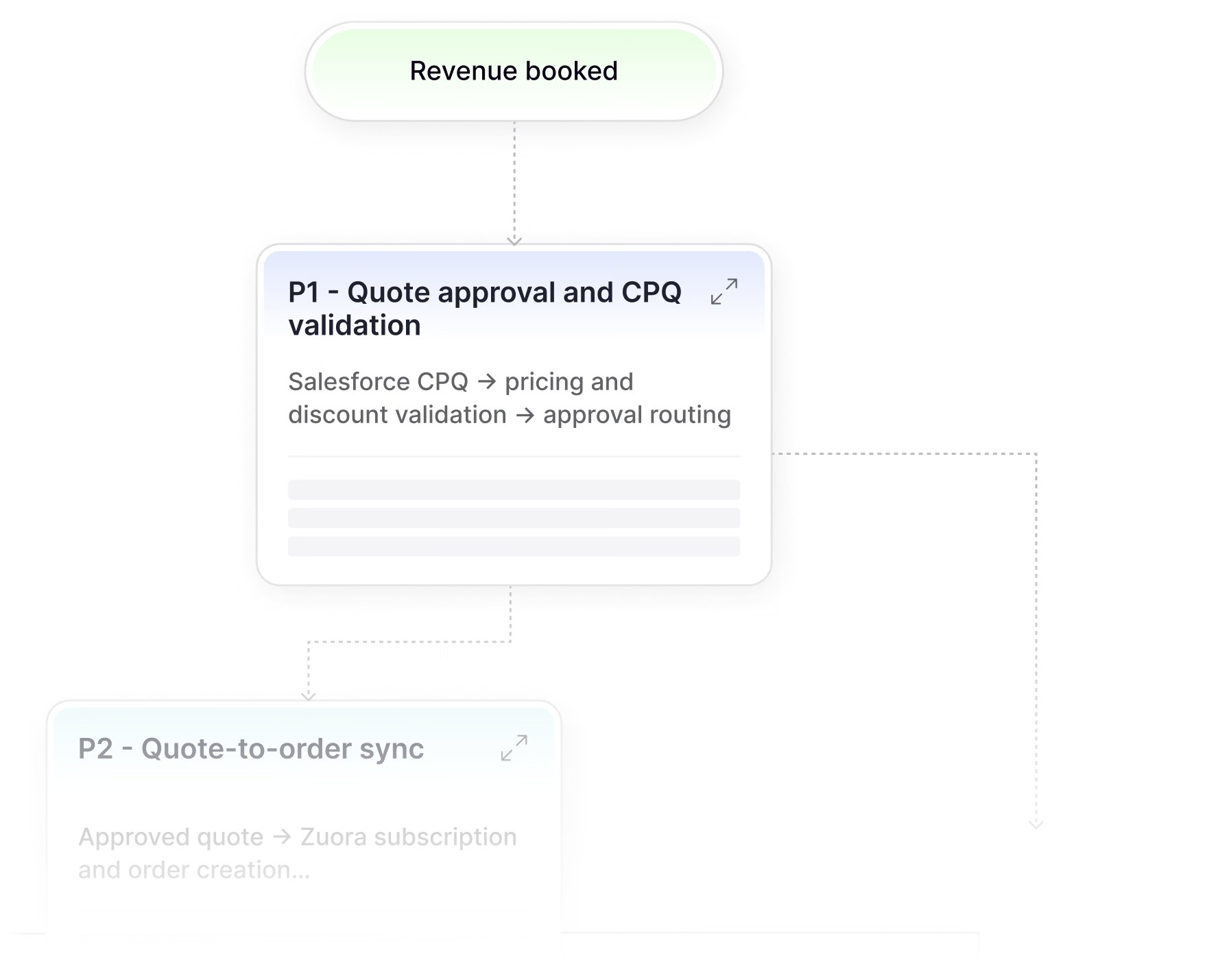
A global business services firm with more than 100,000 staff used this approach across 16 IT teams and 100+ users, with zero integrations. Worktrace AI observed 8,200+ hours of real work, found 88% of it addressable by agents, and surfaced 62 build-ready agent blueprints. Discovery that had taken three to six months was completed in under three weeks, and agent build time dropped from 10 to 15 days to a matter of hours.
How to choose: process mining, task mining, or discovery
Choose the approach based on the question you need to answer:
- Where are the bottlenecks in our business processes? Choose process mining to analyze event logs, identify delays, and measure cycle times across ERP, CRM, and other systems.
- How do employees complete a specific task? Choose task mining to capture desktop interactions, manual steps, and workarounds.
- Which workflows should we automate with AI agents? Choose screen-level workflow discovery to understand work across applications, identify decision points, and generate automation-ready specifications.
- Who actually runs the automation once we’ve found it? Choose a platform that goes beyond a report. Screen-level discovery that produces ready-to-run computer-use agents means you finish the process with a working agent in your environment.
Consider insurance claims processing. Process mining can show where claims stall between first notice of loss (FNOL) and payout. Task mining can show how adjusters move between the claims system, email, and policy documents. Screen-level discovery can show why adjusters take each step, which decisions follow a clear rule an agent could handle, and which need an adjuster's judgment.
Try using Worktrace AI’s workflow automation assessment framework to evaluate opportunities and determine the appropriate level of AI autonomy.
Seeing what happened isn't the same as knowing what to build
Process mining and task mining reveal how work happens. AI transformation demands a deeper understanding: what should an agent do, why, and where is human judgment needed?
Answering those questions requires visibility into decisions, exceptions, and workflows across applications. This kind of visibility is also critical to Global Business Services (GBS) transformation and to identifying the right automation opportunities.
Want the end-to-end view and the reason behind each step? Request a Worktrace AI demo to see how your team actually works and where automation can deliver value.




Frequently asked questions
Read more
November 18, 2026
Business process standardization: Standardize every variant, not just the happy path
Most process standards capture only one version of the work. Learn the benefits of business process standardization, the four steps, and how to map every variant first.



Ready to evaluate the results?

Agents you'll actually use
Worktrace discovery maps exactly how your team works and finds the most repetitive work. Then it builds Al agents that do that work.
We'll get in touch with you shortly.




of enterprise work is automatable